SMS opt-in form example
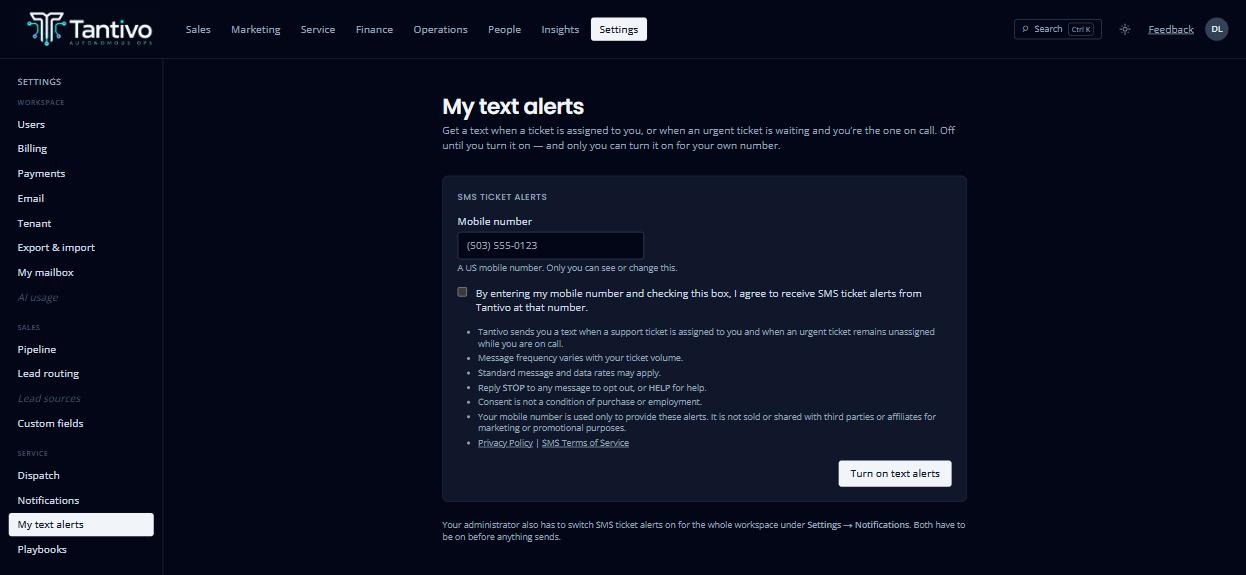
This page shows the form a signed-in Tantivo user completes to enroll themselves in Tantivo SMS Ticket Alerts. It is published for mobile carriers and messaging reviewers, who cannot open the real form because it sits behind a customer login.
The live form is at app.tantivo.ai/settings/my-notifications, reached in the application under Settings → My text alerts. The image below is a capture of that page. It is not interactive and submits nothing.
What the user agrees to
The checkbox is unchecked until the user checks it, and reads:
“By entering my mobile number and checking this box, I agree to receive SMS ticket alerts from Tantivo at that number.”
These disclosures appear beneath it, before submission:
- Tantivo sends you a text when a support ticket is assigned to you and when an urgent ticket remains unassigned while you are on call.
- Message frequency varies with your ticket volume.
- Standard message and data rates may apply.
- Reply STOP to any message to opt out, or HELP for help.
- Consent is not a condition of purchase or employment.
- Your mobile number is used only to provide these alerts. It is not sold or shared with third parties or affiliates for marketing or promotional purposes.
- Privacy Policy | SMS Terms of Service
Who can enroll a user
Each person must opt in for themselves. Workspace administrators cannot create, modify, or submit SMS consent for another user. This restriction is enforced by server-side authorization and database access controls, not only by the user interface.
An administrator can make the feature available to their organization, but doing so enrolls nobody — the two settings are separate, and both must be on before any message is sent.
Stopping messages
Reply STOP to any message, or turn alerts off on the same settings page. Opting out of SMS does not disable or affect the user’s Tantivo account. Full program terms are in the SMS Terms of Service.